
Turn approved website questions into clear next steps.
Give visitors a governed self-service path for products, services, pricing, and processes—with explicit content scope, source freshness, and human fallback.
Cayra website assistant
Configured preview
How can I help with products, pricing, or delivery?
Which plan fits a growing operations team?
I can show the approved plan comparison or connect you with the team.
Lightweight website setup
Self-service replies
Conversion support
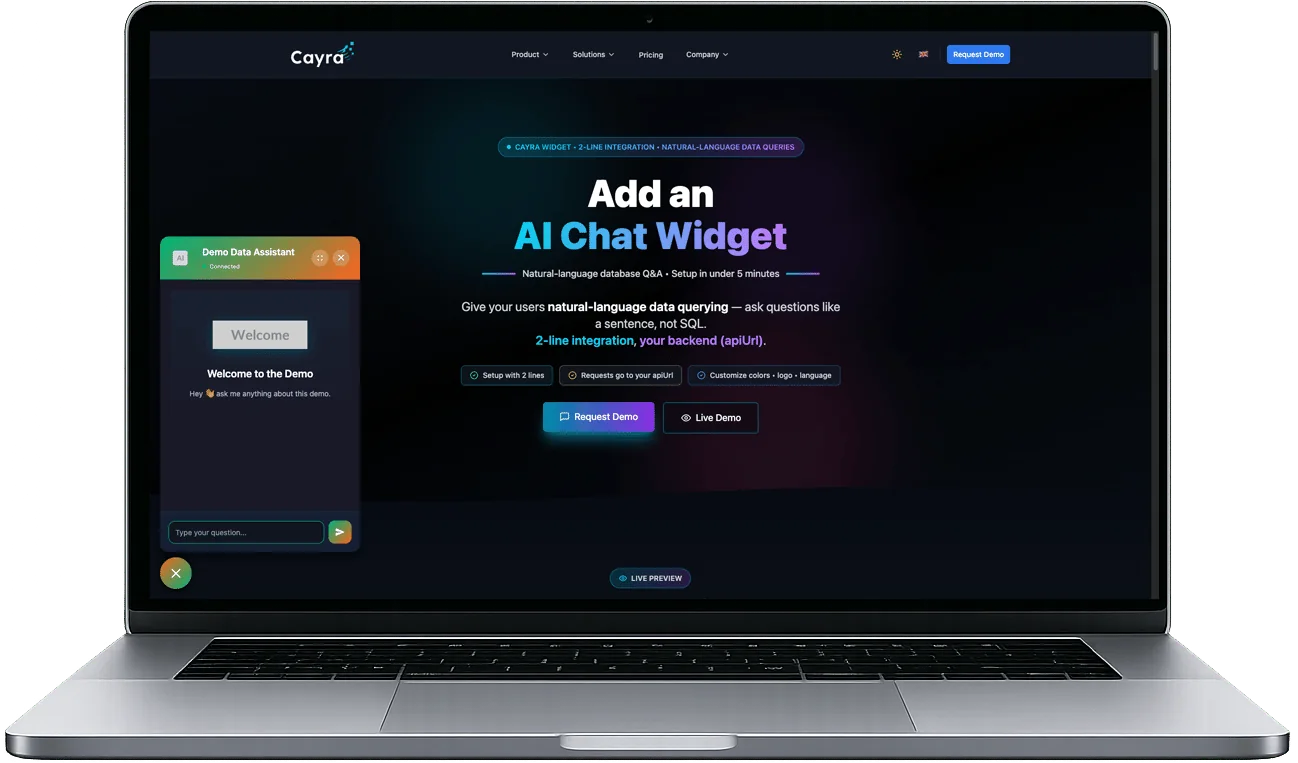
See the widget inside a complete website experience.
This original Cayra product capture shows the relationship between the website, launcher, and conversation surface on desktop.
How to read this preview
- Use the capture to evaluate placement and interaction context.
- Current behavior is defined by the surrounding product documentation and configured data scope.
- Text inside the capture is illustrative and does not establish setup-time, availability, or performance commitments.
Configure, validate, and publish the widget.
Add the widget, tailor the approved content and brand experience, then test answer and escalation boundaries.
Add it to your website
Launch Chat Widget by adding the workspace-specific snippet to your site after the data, content, permissions, and fallback flow are configured.
Customize it to match your brand
Adjust colors, logo, welcome message, and placement to fit your brand.
Answer approved questions
A visitor asks about configured products, pricing, contact details, stock, or processes. Timing and freshness depend on the selected sources.
Go live after configuration and review.
Measure value through answer quality, fallback rate, content gaps, and the effect on the current support flow.
Help visitors find approved information in the buying journey.
Measure answer quality, handoff rate, unresolved topics, and conversion impact rather than assuming an outcome.
A visitor may need to email or call your team. Answer time and handoff vary, and the question can interrupt the buying journey.
The customer uses the configured self-service flow and can be routed to the correct next step or human fallback.
Offer configured self-service
Visitors can use the configured self-service flow whenever the selected service is available.
Support conversion
Measure whether clearer answers reduce friction against the existing buying flow.
Reduce repeated questions
Move approved recurring questions to self-service and monitor escalation quality.
Discover missing information
Frequent questions help you spot missing content, new demand patterns, and improvement areas.
Use an approved baseline and evaluation period before attributing a business outcome to Chat Widget.
Different industries require different content and controls.
These representative workflows show what to evaluate for e-commerce, hospitality, education, healthcare, and software.
E-Commerce Websites
Approved product questions, inventory checks, shipping details, and payment options can be handled in one conversation flow.
The visitor reaches approved product information or the documented human handoff.
Corporate Websites
Offer approved information about your services, references, and contact routes.
The prospect reaches the configured service information and next contact step.
Hotel and Booking Websites
Configured room pricing, availability, amenities, and reservation conditions can be presented from approved sources.
The visitor reaches the configured booking information or fallback path.
Education and Course Platforms
Provide clear answers about course content, registration flow, fees, and instructors.
The student reaches the configured registration information or fallback path.
Healthcare and Clinic Websites
Limit healthcare use to approved administrative information such as appointments, providers, locations, and availability—not diagnosis or treatment advice.
Measure scheduling completion and escalation while maintaining the approved clinical boundary.
SaaS and Software Companies
Answer questions about product capabilities, pricing, account setup, and integrations.
The visitor reaches the appropriate pricing or account path with clearer context.
Define the outcome you intend to measure.
The scenarios below are evaluation examples, not customer results or performance guarantees.
Online Store
An online store wants to evaluate whether unanswered product questions create friction before checkout.
Configure Chat Widget for approved product, inventory, shipping, and payment content with a human fallback.
Boutique Hotel
A hotel wants to test self-service for recurring questions without replacing its booking or front-desk process.
Configure approved room, amenity, policy, and booking information, then route unsupported cases to the documented next step.
Online Education Platform
An education platform wants to evaluate recurring questions about courses and enrollment.
Configure approved course, schedule, fee, and registration content with a clear escalation route.
Software Company
A software company wants to test self-service for common product, pricing, and integration questions.
Configure approved answers and route account-specific or unsupported questions to the appropriate team.
Answer approved questions and reveal patterns to review.
Use configured replies for visitors, then review question themes, unresolved topics, and handoffs with your team.
Question and answer
Respond to approved questions about products, services, pricing, contact information, and order processes.
Information delivery
Present information from approved site content or connected sources in a clear, structured format.
Configured recommendations
Present approved product, package, or service options within defined recommendation rules.
Data lookup
Provide query-derived stock, availability, or other configured business information with source-specific freshness.
Configurable language experience
Test each supported language with representative content before launch.
Behavior signals to review
Where analytics and consent are configured, question patterns and handoffs can help your team identify content and routing issues.
Proactive support
Evaluate approved prompts for selected visitor states without assuming a conversion outcome.
Trend and opportunity analysis
Review repeated questions, missing information, and emerging topics as inputs to content or campaign decisions.
Catch issues early
Monitor selected return, quality, or support-volume signals where the required event data is available.
Get the code, configure it, test it, and launch.
Implementation requires website access, approved content and data, permission review, consent behavior, and a fallback path.
Get the widget code and add it to your site
Take the generated code from the Cayra admin panel and place it right before the closing tag in your HTML structure.
<script>
  window.CayraWidgetConfig = {
    apiUrl: 'https://your-server.com',
    title: 'Need help?',
    widgetColor: '#00BCD4'
  };
</script>
<script src="https://your-server.com/static/widget/widget.js"></script>
</body>
Get started in 4 steps
Get the code, add it to your site, adapt it to your brand, validate boundaries, and launch with an owner.
Get the widget code
Open the Chat Widget settings in the Cayra admin panel and obtain the implementation code for the supported configuration.
Add it to your website
Copy the code and paste it into your HTML file right before the `</body>` tag.
Customize it
Adjust the colors, logo, welcome message, and widget position to match your brand.
Publish and monitor
Once the widget is live, regularly review incoming questions, demand patterns, and conversion impact.
Review the widget after launch.
Use question patterns and unresolved topics to improve content, routing, and the configured self-service scope.
Use Chat Widget more effectively
A clear welcome message, approved information, and regular review can make the widget a measurable self-service channel.
Short answers to the core setup and usage questions.
We gathered the questions people ask most often in one place.
Launch one governed self-service workflow.
Start with approved content, a documented fallback path, and a measurable website evaluation.